前言
具体效果如下
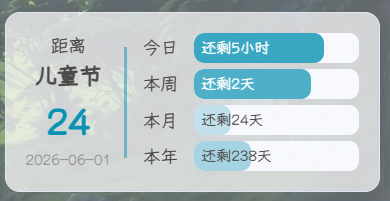
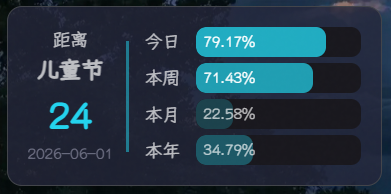
最终效果
侧边栏多了一张卡片,左边显示距离最近一个日期节点的倒计时天数,右边是今日/本周/本月/本年的时间进度条。鼠标悬停进度条时,剩余时间会切换成百分比显示。
支持四种日期节点类型:
类型 | 示例 | 数据来源 |
|---|---|---|
法定假期 | 春节、国庆、中秋 | lunar-go 内置 + holiday-cn API 降级 |
民俗节日 | 七夕、腊八、除夕 | lunar-go 农历计算 |
公历纪念日 | 儿童节、教师节 | 静态定义 |
节气 | 小寒、立春、冬至 | lunar-go 天文算法 |
方案一:React / Next.js 组件集成
如果你的博客是基于 React 或 Next.js 的,可以直接用组件的方式集成。
1 创建组件文件
在组件目录下创建 CardCountdown.tsx:
TSX
"use client";

import { useState, useEffect, useCallback, memo } from "react";
import styles from "./CardCountdown.module.css";

interface CardCountdownProps {
  targetDate?: string;
  targetName?: string;
  holidayApiUrl?: string;
}

interface HolidayData {
  name: string;
  date: string;
  type?: string;
}

interface ProgressItem {
  text: string;
  unit: string;
  remaining: number;
  percentage: number;
}

async function fetchNextHoliday(apiUrl: string): Promise<HolidayData | null> {
  try {
    const resp = await fetch(apiUrl);
    const json = await resp.json();
    if (json.code === 200 && json.data) {
      return { name: json.data.name, date: json.data.date, type: json.data.type };
    }
    return null;
  } catch {
    return null;
  }
}

function useNextHoliday(apiUrl?: string) {
  const [holiday, setHoliday] = useState<HolidayData | null>(null);

  useEffect(() => {
    if (!apiUrl) return;
    let cancelled = false;
    const cached = localStorage.getItem("next_holiday");
    if (cached) {
      try {
        const parsed = JSON.parse(cached) as HolidayData;
        const today = new Date();
        today.setHours(0, 0, 0, 0);
        if (new Date(parsed.date) >= today) {
          setHoliday(parsed);
          return;
        }
      } catch {}
    }
    fetchNextHoliday(apiUrl).then(data => {
      if (!cancelled && data) {
        setHoliday(data);
        localStorage.setItem("next_holiday", JSON.stringify(data));
      }
    });
    return () => { cancelled = true; };
  }, [apiUrl]);

  return holiday;
}

function calcDayProgress(): { remaining: number; percentage: number } {
  const hours = new Date().getHours();
  return { remaining: 24 - hours, percentage: (hours / 24) * 100 };
}

function calcWeekProgress(): { remaining: number; percentage: number } {
  const day = new Date().getDay();
  const passed = day === 0 ? 6 : day - 1;
  return { remaining: 6 - passed, percentage: ((passed + 1) / 7) * 100 };
}

function calcMonthProgress(): { remaining: number; percentage: number } {
  const now = new Date();
  const total = new Date(now.getFullYear(), now.getMonth() + 1, 0).getDate();
  const passed = now.getDate() - 1;
  return { remaining: total - passed, percentage: (passed / total) * 100 };
}

function calcYearProgress(): { remaining: number; percentage: number } {
  const now = new Date();
  const start = new Date(now.getFullYear(), 0, 1);
  const isLeap = (now.getFullYear() % 4 === 0 && now.getFullYear() % 100 !== 0) || now.getFullYear() % 400 === 0;
  const total = 365 + (isLeap ? 1 : 0);
  const passed = Math.floor((now.getTime() - start.getTime()) / 86400000);
  return { remaining: total - passed, percentage: (passed / total) * 100 };
}

function getProgressItems(): ProgressItem[] {
  const day = calcDayProgress();
  const week = calcWeekProgress();
  const month = calcMonthProgress();
  const year = calcYearProgress();

  return [
    { text: "今日", unit: "小时", ...day },
    { text: "本周", unit: "天", ...week },
    { text: "本月", unit: "天", ...month },
    { text: "本年", unit: "天", ...year },
  ];
}

function calcDaysUntil(targetDate: string): number {
  const now = new Date();
  now.setHours(0, 0, 0, 0);
  const target = new Date(targetDate);
  return Math.round((target.getTime() - now.getTime()) / 86400000);
}

export const CardCountdown = memo(function CardCountdown({
  targetDate,
  targetName,
  holidayApiUrl,
}: CardCountdownProps) {
  const [items, setItems] = useState<ProgressItem[]>([]);
  const holiday = useNextHoliday(holidayApiUrl);

  const update = useCallback(() => {
    setItems(getProgressItems());
  }, []);

  useEffect(() => {
    update();
    const timer = setInterval(update, 600000);
    return () => clearInterval(timer);
  }, [update]);

  if (items.length === 0) return null;

  const today = new Date();
  today.setHours(0, 0, 0, 0);

  const customDateValid = targetDate && new Date(targetDate) >= today;
  const holidayDateValid = holiday && new Date(holiday.date) >= today;

  let displayDate = "";
  let displayName = "";

  if (customDateValid && holidayDateValid) {
    if (new Date(targetDate!) <= new Date(holiday.date)) {
      displayDate = targetDate!;
      displayName = targetName || "";
    } else {
      displayDate = holiday.date;
      displayName = holiday.name;
    }
  } else if (customDateValid) {
    displayDate = targetDate!;
    displayName = targetName || "";
  } else if (holidayDateValid) {
    displayDate = holiday.date;
    displayName = holiday.name;
  }

  const daysUntil = displayDate ? calcDaysUntil(displayDate) : 0;

  return (
    <div className={styles.cardCountdown}>
      <div className={styles.itemContent}>
        {displayDate && (
          <div className={styles.countLeft}>
            <span className={styles.text}>距离</span>
            <span className={styles.name}>{displayName}</span>
            <span className={styles.time}>{daysUntil}</span>
            <span className={styles.date}>{displayDate}</span>
          </div>
        )}
        <div className={styles.countRight}>
          {items.map(item => (
            <div key={item.text} className={styles.countItem}>
              <div className={styles.itemName}>{item.text}</div>
              <div className={styles.itemProgress}>
                <div
                  className={styles.progressBar}
                  style={{ width: `${item.percentage}%`, opacity: item.percentage / 100 }}
                />
                <span className={`${styles.percentage} ${item.percentage >= 46 ? styles.many : ""}`}>
                  <span className={styles.tip}>还剩</span>
                  {item.remaining}
                  <span className={styles.tip}>{item.unit}</span>
                </span>
                <span className={`${styles.remaining} ${item.percentage >= 60 ? styles.many : ""}`}>
                  {item.percentage.toFixed(2)}%
                </span>
              </div>
            </div>
          ))}
        </div>
      </div>
    </div>
  );
});

CardCountdown.displayName = "CardCountdown";

export default CardCountdown;
2 创建样式文件
在同目录下创建 CardCountdown.module.css:
CSS
.cardCountdown {
  position: relative;
  display: flex;
  flex-direction: column;
  padding: 16px;
  overflow: hidden;
  background: var(--anzhiyu-card-bg, #fff);
  border: var(--style-border, 1px solid #e0e0e0);
  border-radius: 12px;
  box-shadow: var(--anzhiyu-shadow-card, 0 4px 12px rgba(0, 0, 0, 0.05));
  transition: box-shadow 0.3s ease;
}

.cardCountdown:hover {
  box-shadow: var(--anzhiyu-shadow-card-hover, 0 8px 24px rgba(0, 0, 0, 0.1));
}

.itemContent {
  display: flex;
}

.countLeft {
  position: relative;
  display: flex;
  flex-direction: column;
  margin-right: 0.8rem;
  line-height: 1.5;
  align-items: center;
  justify-content: center;
}

.text {
  font-size: 14px;
  color: var(--anzhiyu-fontcolor, #333);
}

.name {
  font-weight: bold;
  font-size: 18px;
  color: var(--anzhiyu-fontcolor, #333);
}

.time {
  font-size: 30px;
  font-weight: bold;
  color: var(--anzhiyu-main, #49b1f5);
}

.date {
  font-size: 12px;
  opacity: 0.6;
  color: var(--anzhiyu-secondtext, #999);
}

.countLeft::after {
  content: "";
  position: absolute;
  right: -0.8rem;
  width: 2px;
  height: 80%;
  background-color: var(--anzhiyu-main, #49b1f5);
  opacity: 0.5;
}

.countRight {
  flex: 1;
  margin-left: 0.8rem;
  display: flex;
  flex-direction: column;
  justify-content: space-between;
}

.countItem {
  display: flex;
  flex-direction: row;
  align-items: center;
  height: 24px;
}

.itemName {
  font-size: 14px;
  margin-right: 0.8rem;
  white-space: nowrap;
  color: var(--anzhiyu-fontcolor, #333);
}

.itemProgress {
  position: relative;
  display: flex;
  flex-direction: row;
  align-items: center;
  justify-content: space-between;
  height: 100%;
  width: 100%;
  border-radius: 8px;
  background-color: var(--anzhiyu-background, #f5f5f5);
  overflow: hidden;
}

.progressBar {
  height: 100%;
  border-radius: 8px;
  background-color: var(--anzhiyu-main, #49b1f5);
  transition: width 0.6s ease;
}

.percentage,
.remaining {
  position: absolute;
  font-size: 12px;
  margin: 0 6px;
  transition: opacity 0.3s ease-in-out, transform 0.3s ease-in-out;
}

.many {
  color: #fff;
}

.remaining {
  opacity: 0;
  transform: translateX(10px);
}

.tip {
  font-size: 12px;
}

.cardCountdown:hover .remaining {
  transform: translateX(0);
  opacity: 1;
}

.cardCountdown:hover .percentage {
  transform: translateX(-10px);
  opacity: 0;
}

@media (max-width: 992px) {
  .cardCountdown {
    display: none;
  }
}
CSS 变量使用了
var(--anzhiyu-xxx, fallback)的写法,如果你的项目没有这些变量,会自动使用逗号后面的回退值,不影响显示效果。
3 在侧边栏中引入组件
TSX
import { CardCountdown } from "./CardCountdown";

// 纯手动模式:只倒计时自定义日期
<CardCountdown targetDate="2026-01-01" targetName="元旦" />

// 自动模式:从后端 API 获取下一个节假日(需要后端提供接口)
<CardCountdown holidayApiUrl="/api/public/holiday/next" />

// 混合模式:自定义日期优先,过期后自动切换到节假日
<CardCountdown
  targetDate="2026-06-15"
  targetName="生日"
  holidayApiUrl="/api/public/holiday/next"
/>
4 配置说明
Props | 类型 | 说明 |
|---|---|---|
|
| 自定义倒计时目标日期,格式 |
|
| 自定义目标名称,如「生日」 |
|
| 节假日 API 地址,返回格式见下方 |
节假日 API 返回格式:
JSON
{
  "code": 200,
  "data": {
    "name": "儿童节",
    "date": "2026-06-01",
    "type": "solar_festival"
  }
}
显示优先级: 自定义日期未过期 → 自定义日期显示;自定义日期已过期 → 自动显示 API 返回的下一个节假日;都没有 → 只显示右侧进度条。
方案二:原生 JS 集成(Hexo / Hugo 等传统博客)
如果你的博客是基于 Hexo、Hugo 等模板引擎的,用原生 JS 就够了
配置请参考 梦爱吃鱼 和 Penry 的教程,这里不再赘述.



1 创建 JS 文件
在博客目录的 source 文件夹下创建 countdown.js 文件。为了方便管理,可以在 source 文件夹下新建一个 static 文件夹,然后把 countdown.js 放在里面。
JS
const CountdownTimer = (() => {
    const config = {
        targetDate: "2026-01-01",
        targetName: "元旦",
        units: {
            day: { text: "今日", unit: "小时" },
            week: { text: "本周", unit: "天" },
            month: { text: "本月", unit: "天" },
            year: { text: "本年", unit: "天" }
        }
    };

    const calculators = {
        day: () => {
            const hours = new Date().getHours();
            return {
                remaining: 24 - hours,
                percentage: (hours / 24) * 100
            };
        },
        week: () => {
            const day = new Date().getDay();
            const passed = day === 0 ? 6 : day - 1;
            return {
                remaining: 6 - passed,
                percentage: ((passed + 1) / 7) * 100
            };
        },
        month: () => {
            const now = new Date();
            const total = new Date(now.getFullYear(), now.getMonth() + 1, 0).getDate();
            const passed = now.getDate() - 1;
            return {
                remaining: total - passed,
                percentage: (passed / total) * 100
            };
        },
        year: () => {
            const now = new Date();
            const start = new Date(now.getFullYear(), 0, 1);
            const isLeap = (now.getFullYear() % 4 === 0 && now.getFullYear() % 100 !== 0) || now.getFullYear() % 400 === 0;
            const total = 365 + (isLeap ? 1 : 0);
            const passed = Math.floor((now - start) / 86400000);
            return {
                remaining: total - passed,
                percentage: (passed / total) * 100
            };
        }
    };

    function updateCountdown() {
        const elements = ['eventName', 'eventDate', 'daysUntil', 'countRight']
            .map(id => document.getElementById(id));

        if (elements.some(el => !el)) return;

        const [eventName, eventDate, daysUntil, countRight] = elements;
        const now = new Date();
        const target = new Date(config.targetDate);

        eventName.textContent = config.targetName;
        eventDate.textContent = config.targetDate;
        daysUntil.textContent = Math.round((target - now.setHours(0,0,0,0)) / 86400000);

        countRight.innerHTML = Object.entries(config.units)
            .map(([key, {text, unit}]) => {
                const {remaining, percentage} = calculators[key]();
                return `
                    <div class="cd-count-item">
                        <div class="cd-item-name">${text}</div>
                        <div class="cd-item-progress">
                            <div class="cd-progress-bar" style="width: ${percentage}%; opacity: ${percentage/100}"></div>
                            <span class="cd-percentage ${percentage >= 46 ? 'cd-many' : ''}">${percentage.toFixed(2)}%</span>
                            <span class="cd-remaining ${percentage >= 60 ? 'cd-many' : ''}">
                                <span class="cd-tip">还剩</span>${remaining}<span class="cd-tip">${unit}</span>
                            </span>
                        </div>
                    </div>
                `;
            }).join('');
    }

    function injectStyles() {
        const styles = `
            .card-countdown .item-content {
                display: flex;
            }
            .cd-count-left {
                position: relative;
                display: flex;
                flex-direction: column;
                margin-right: 0.8rem;
                line-height: 1.5;
                align-items: center;
                justify-content: center;
            }
            .cd-count-left .cd-text {
                font-size: 14px;
            }
            .cd-count-left .cd-name {
                font-weight: bold;
                font-size: 18px;
            }
            .cd-count-left .cd-time {
                font-size: 30px;
                font-weight: bold;
                color: var(--anzhiyu-main);
            }
            .cd-count-left .cd-date {
                font-size: 12px;
                opacity: 0.6;
            }
            .cd-count-left::after {
                content: "";
                position: absolute;
                right: -0.8rem;
                width: 2px;
                height: 80%;
                background-color: var(--anzhiyu-main);
                opacity: 0.5;
            }
            .cd-count-right {
                flex: 1;
                margin-left: .8rem;
                display: flex;
                flex-direction: column;
                justify-content: space-between;
            }
            .cd-count-item {
                display: flex;
                flex-direction: row;
                align-items: center;
                height: 24px;
            }
            .cd-item-name {
                font-size: 14px;
                margin-right: 0.8rem;
                white-space: nowrap;
            }
            .cd-item-progress {
                position: relative;
                display: flex;
                flex-direction: row;
                align-items: center;
                justify-content: space-between;
                height: 100%;
                width: 100%;
                border-radius: 8px;
                background-color: var(--anzhiyu-background);
                overflow: hidden;
            }
            .cd-progress-bar {
                height: 100%;
                border-radius: 8px;
                background-color: var(--anzhiyu-main);
            }
            .cd-percentage,
            .cd-remaining {
                position: absolute;
                font-size: 12px;
                margin: 0 6px;
                transition: opacity 0.3s ease-in-out, transform 0.3s ease-in-out;
            }
            .cd-many {
                color: #fff;
            }
            .cd-remaining {
                opacity: 0;
                transform: translateX(10px);
            }
            .card-countdown .item-content:hover .cd-remaining {
                transform: translateX(0);
                opacity: 1;
            }
            .card-countdown .item-content:hover .cd-percentage {
                transform: translateX(-10px);
                opacity: 0;
            }
        `;

        const styleSheet = document.createElement("style");
        styleSheet.textContent = styles;
        document.head.appendChild(styleSheet);
    }

    let timer;
    const start = () => {
        injectStyles();
        updateCountdown();
        timer = setInterval(updateCountdown, 600000);
    };

    ['pjax:complete', 'DOMContentLoaded'].forEach(event => document.addEventListener(event, start));
    document.addEventListener('pjax:send', () => timer && clearInterval(timer));

    return { start, stop: () => timer && clearInterval(timer) };
})();
2 添加组件配置
在 source/_data/widget.yml 中添加以下配置,如果没有 widget.yml 文件,需要先创建一个。
YAML
top:
  - class_name: card-countdown
    id_name:
    name:
    icon:
    html: |
      <div class="cd-count-left">
        <span class="cd-text">距离</span>
        <span class="cd-name" id="eventName"></span>
        <span class="cd-time" id="daysUntil"></span>
        <span class="cd-date" id="eventDate"></span>
      </div>
      <div id="countRight" class="cd-count-right"></div>
3 引入 JS 文件
在主题配置文件(如 _config.anzhiyu.yml)的 inject 配置项的 bottom 中引入 JS 文件:
YAML
inject:
  bottom:
    - <script src="/static/countdown.js"></script>
4 配置目标日期
修改 countdown.js 文件中的 config 对象,将目标日期改为自己想要的:
JS
const config = {
    targetDate: "2026-01-01", // 目标日期
    targetName: "元旦",       // 名称
    ...
}
交互细节
两种方案共享相同的交互逻辑:
倒计时天数常驻显示:左侧始终显示距离目标的天数
进度条默认显示剩余时间:如「还剩 23 小时」「还剩 2 天」
鼠标悬停切换为百分比:hover 时剩余时间淡出,百分比淡入
进度条透明度随百分比变化:越接近 100% 进度条越不透明
每 10 分钟自动刷新:时间进度数据每 10 分钟更新一次
写在最后
这个功能从最简单的手动输入目标日期,一步步扩展到自动获取节假日、节气、民俗节日,中间踩了不少坑——农历计算的 panic、API 返回格式不对、重复请求……但最终的效果还是很满意的,不用每年手动改日期,卡片永远显示最近一个值得期待的节点。
如果你也想给自己的博客加这个功能,欢迎参考实现,有问题可以留言交流。